INDIVIDUAL PROJECT - 2025
INDIVIDUAL PROJECT - 2025
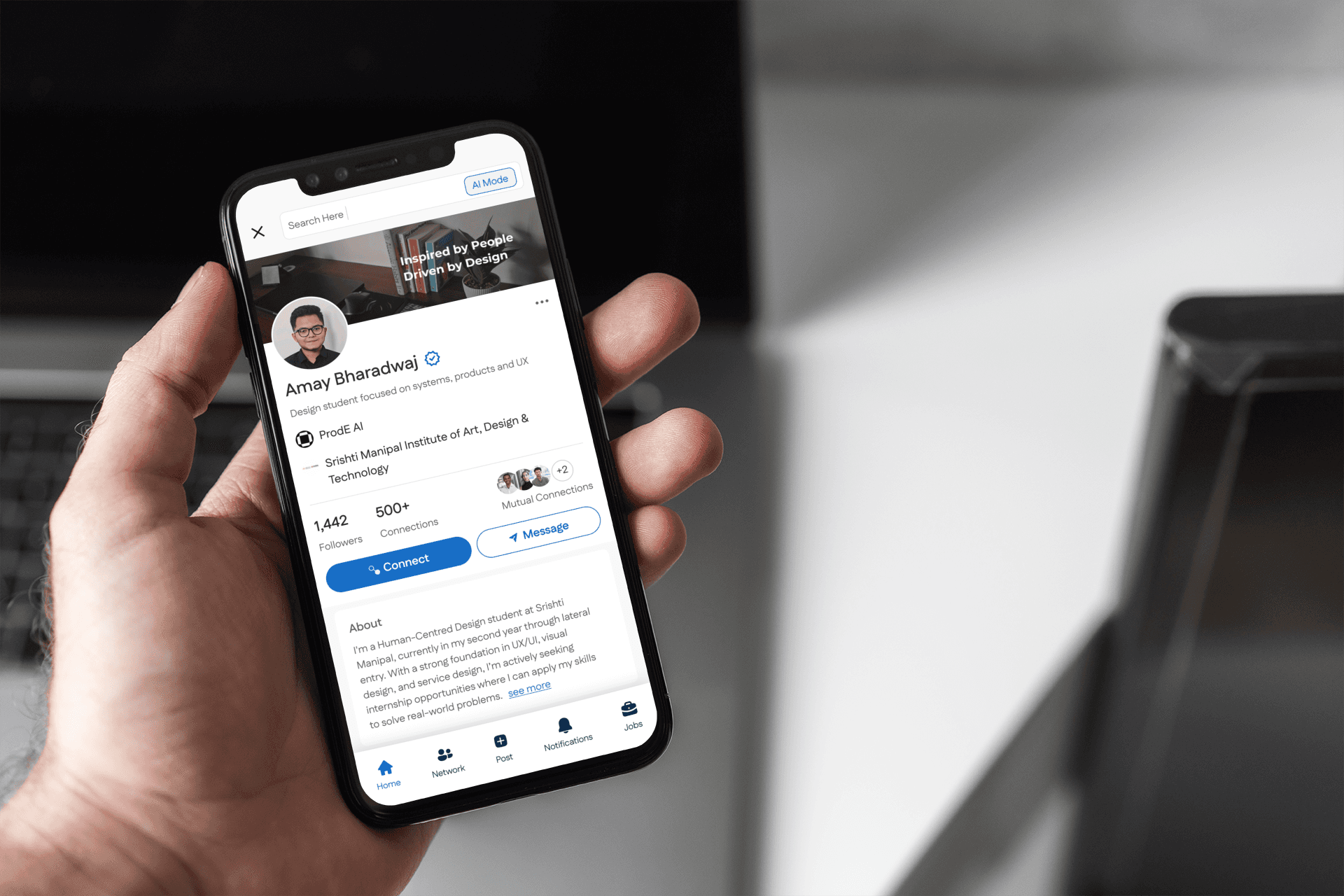
Reimagining LinkedIn’s core experience with cleaner flows, modern interactions and a more intentional hierarchy
Reimagining LinkedIn’s core experience with cleaner flows, modern interactions and a more intentional hierarchy
TIMELINE
TIMELINE
2 Weeks
2 Weeks
KEY SKILLS
KEY SKILLS
Interaction Design, Content Flows, High-Fidelity UI, Layout Systems, Component Design
Interaction Design, Content Flows, High-Fidelity UI, Layout Systems, Component Design
MENTOR
MENTOR
Uzma Ansari
Uzma Ansari
TOOLS
TOOLS
Figma
Photoshop
Figma
Photoshop
OVERVIEW
OVERVIEW
LinkedIn is essential to every professional, yet many of its flows feel heavy and visually dated. This redesign aims to simplify key touchpoints and bring a more modern, premium interaction model to the platform
LinkedIn is essential to every professional, yet many of its flows feel heavy and visually dated. This redesign aims to simplify key touchpoints and bring a more modern, premium interaction model to the platform
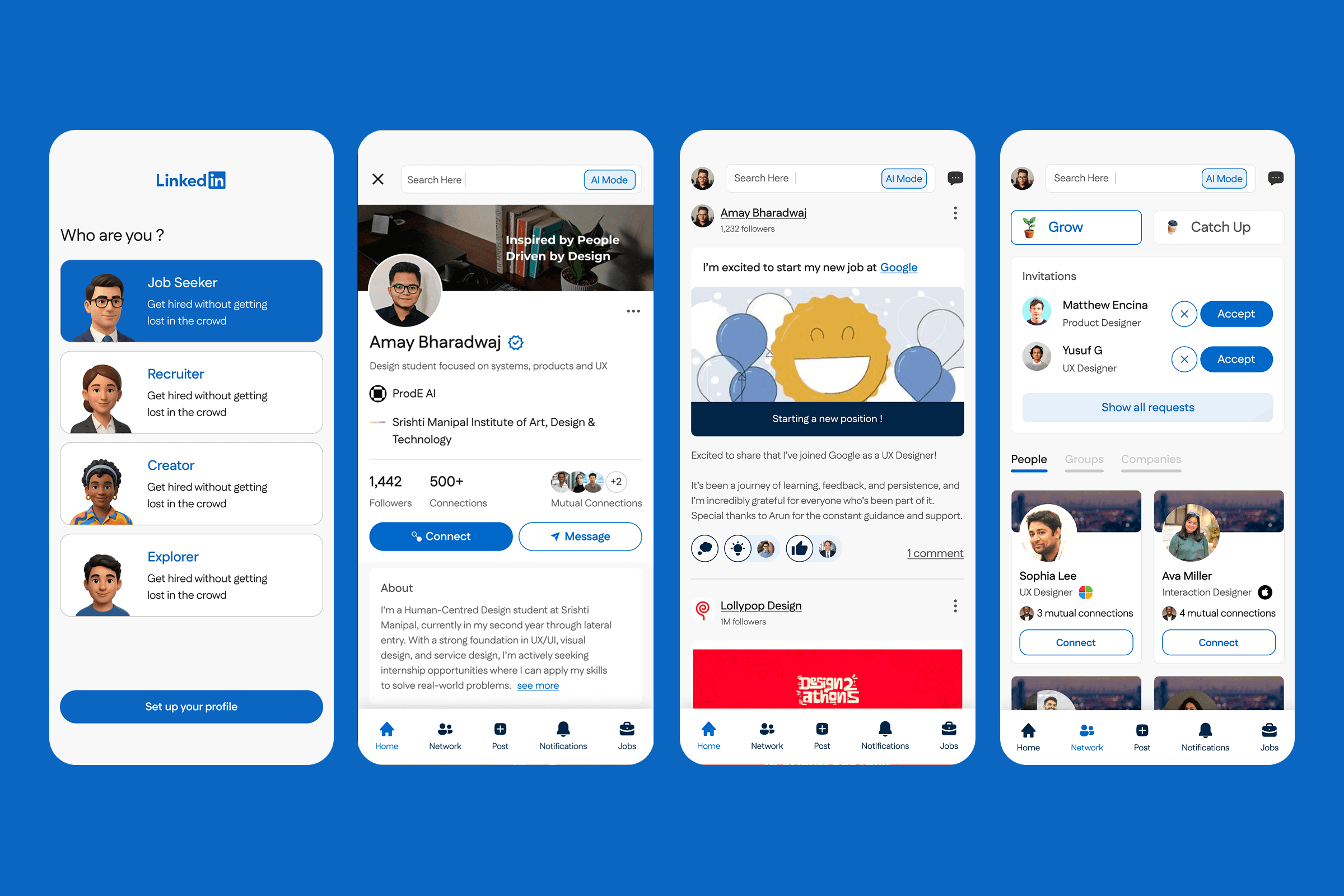
A calmer feed layout with clearer spacing, simplified cards and more intentional content hierarchy
A calmer feed layout with clearer spacing, simplified cards and more intentional content hierarchy
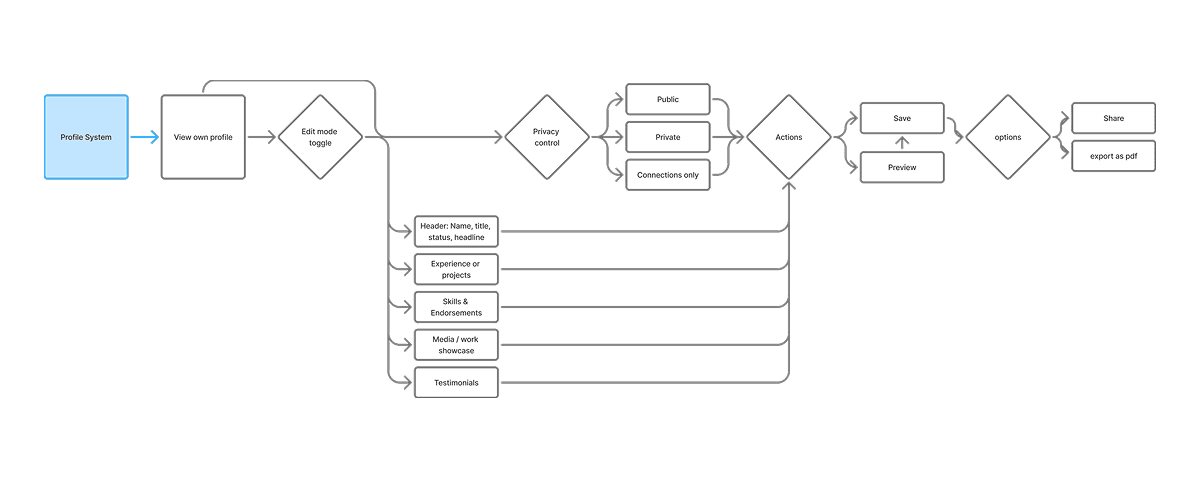
Redesigned profile previews, new connection touchpoints and more consumable interaction cards
Redesigned profile previews, new connection touchpoints and more consumable interaction cards
A refreshed posting flow with structured options, analytics preview and more visual clarity
A refreshed posting flow with structured options, analytics preview and more visual clarity
Reorganized menus, categorized notifications and cleaner job cards for easier scanning
Reorganized menus, categorized notifications and cleaner job cards for easier scanning
DESIGN RATIONALE
Annotated screens outlining the visual and interaction decisions that guided this redesign
Annotated screens outlining the visual and interaction decisions that guided this redesign
Onboarding Screens
Onboarding Screens
Onboarding Screens

Profile Page Screens
Profile Page Screens
Profile Page Screens
Network Screens
Network Screens
Network Screens
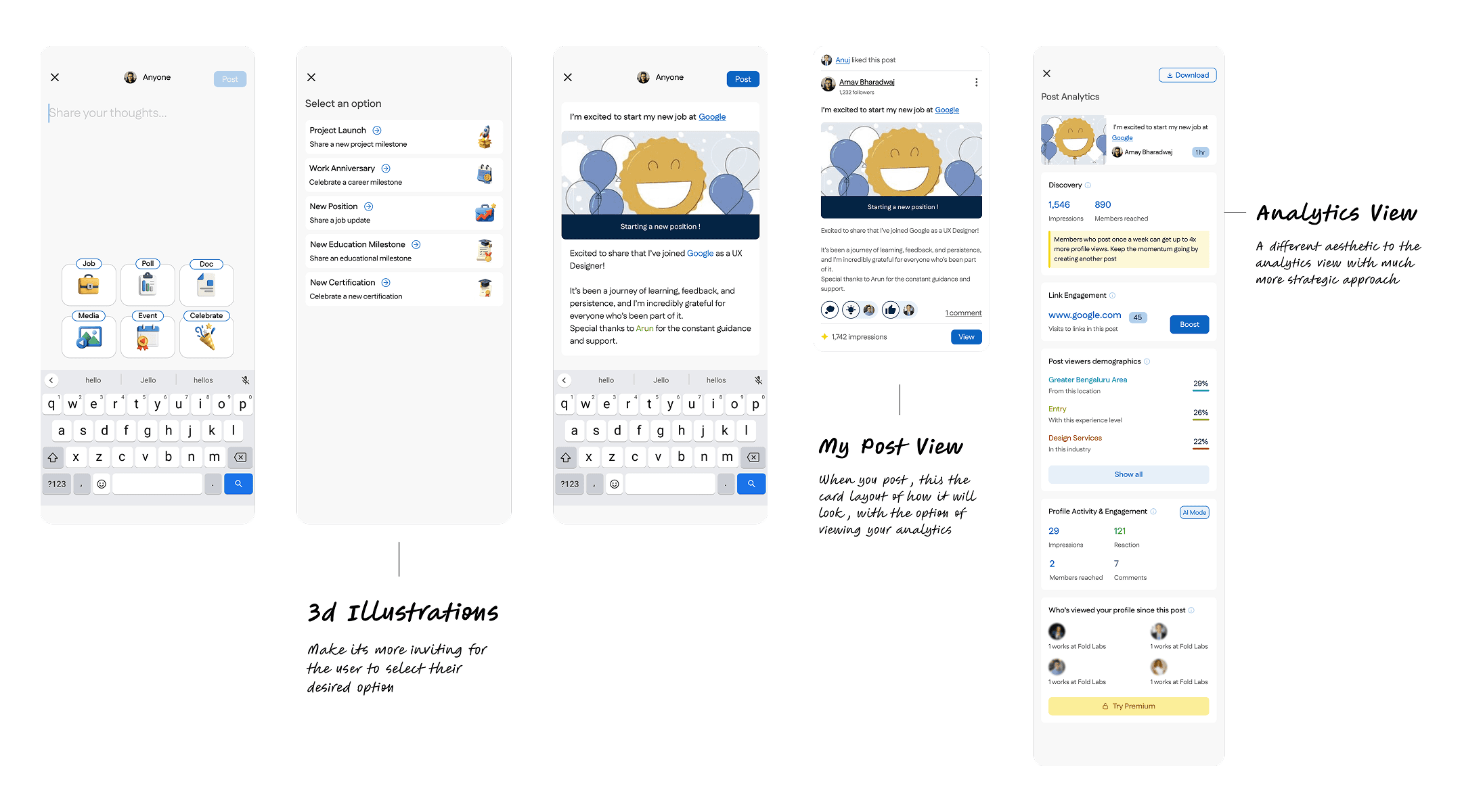
Posting Screens
Posting Screens
Posting Screens
Homepage Screens
Posting Screens
Posting Screens
Jobs Screen
Jobs Screen
Jobs Screen

Notifications Screen
Notifications Screen
Notifications Screen
DESIGN SYSTEM
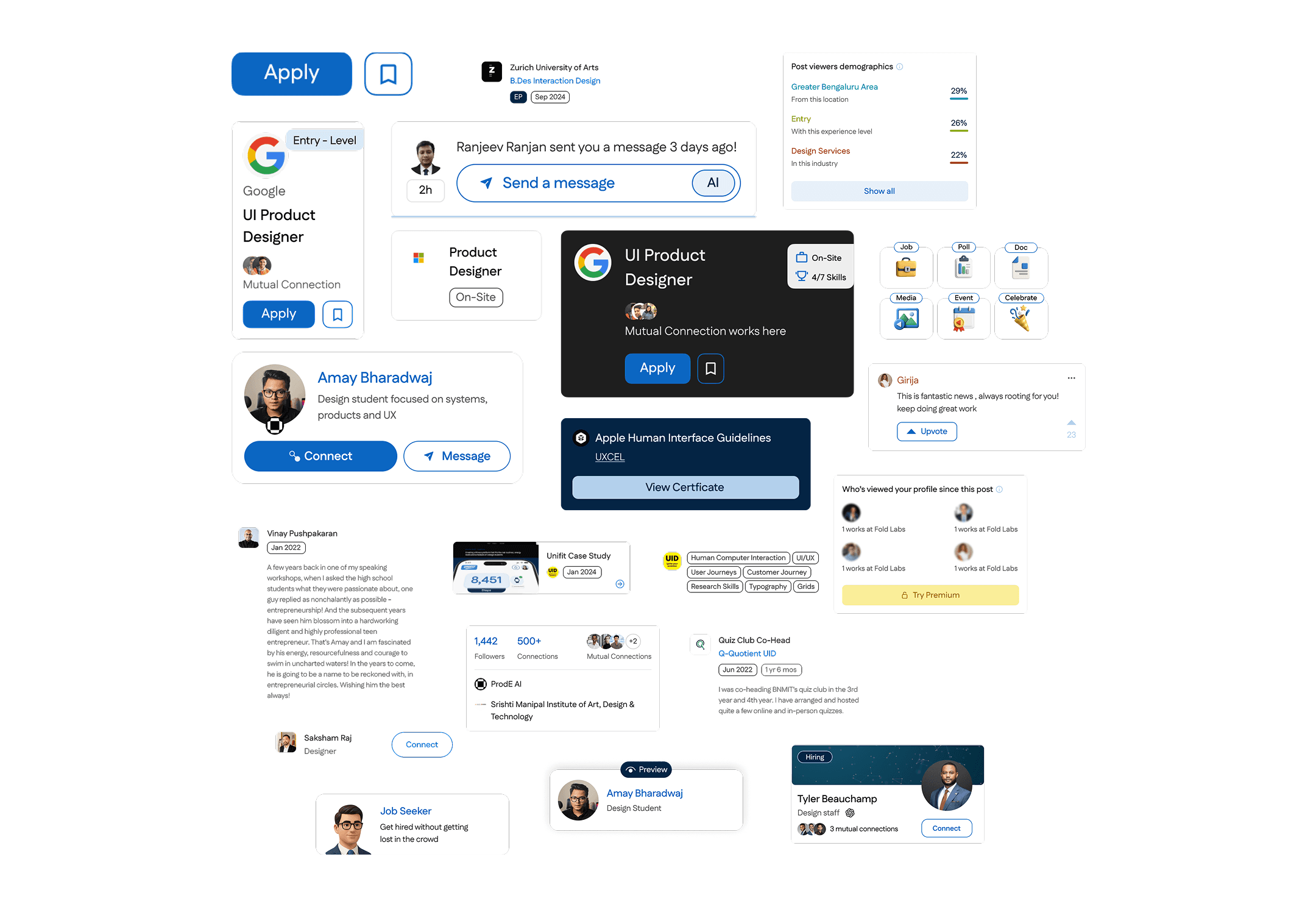
To maintain visual consistency across 20+ screens, I created a modular design system. The system was built with scalability in mind - from light/dark compatibility to supporting new verticals in the future.
To maintain visual consistency across 20+ screens, I created a modular design system. The system was built with scalability in mind - from light/dark compatibility to supporting new verticals in the future.
INTERACTION FLOWS + DESIGN DECISIONS
I redesigned each core LinkedIn flow with clarity and intention, focusing on cleaner interactions and more intuitive decision paths
I redesigned each core LinkedIn flow with clarity and intention, focusing on cleaner interactions and more intuitive decision paths
Onboarding Flow
Onboarding Flow
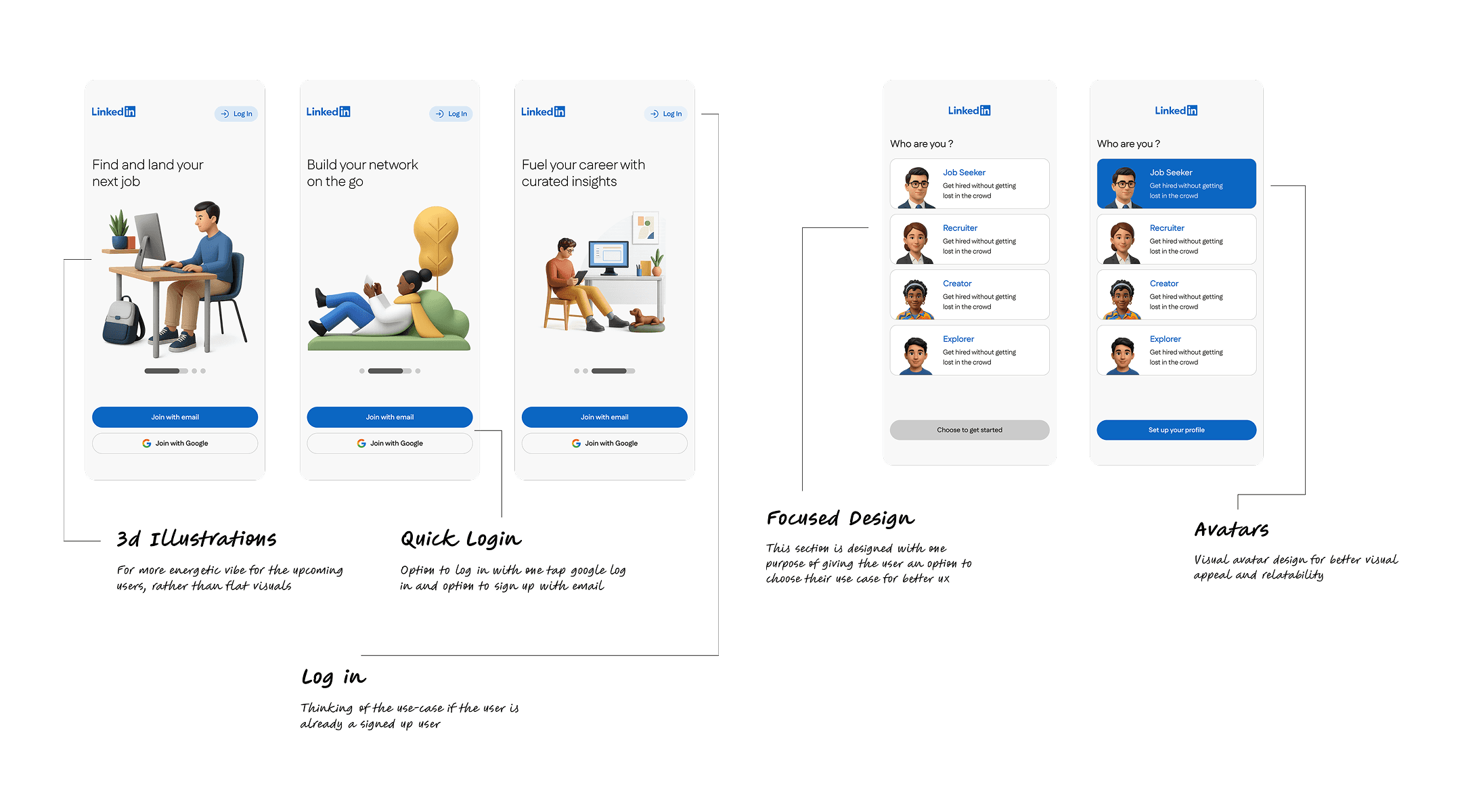
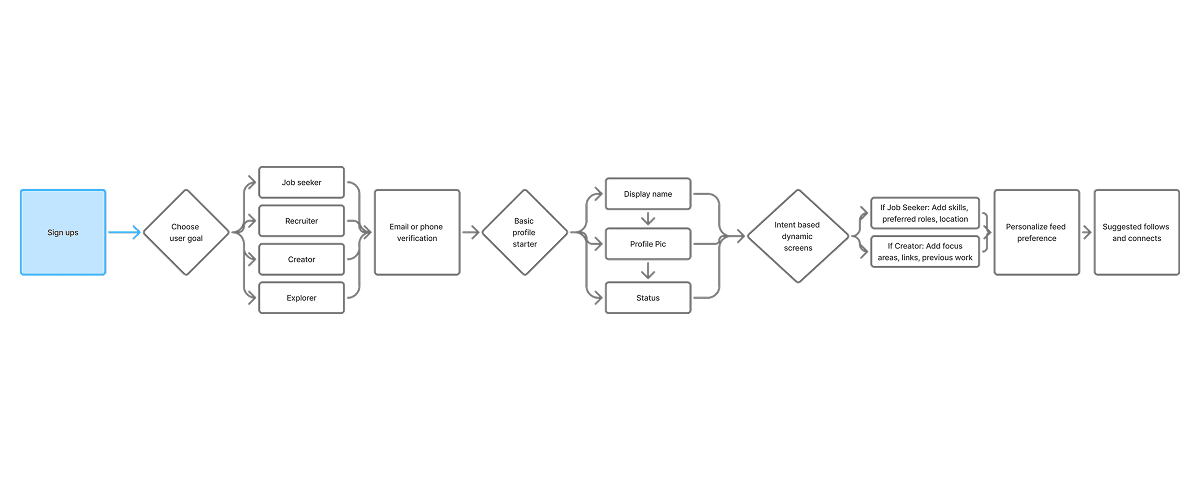
This onboarding flow was redesigned to make the first touchpoint with LinkedIn feel more welcoming, clear and visually modern. Instead of static screens and dense layouts, I introduced lightweight 3D illustrations that set an energetic tone and help new users understand the platform’s core value quickly.
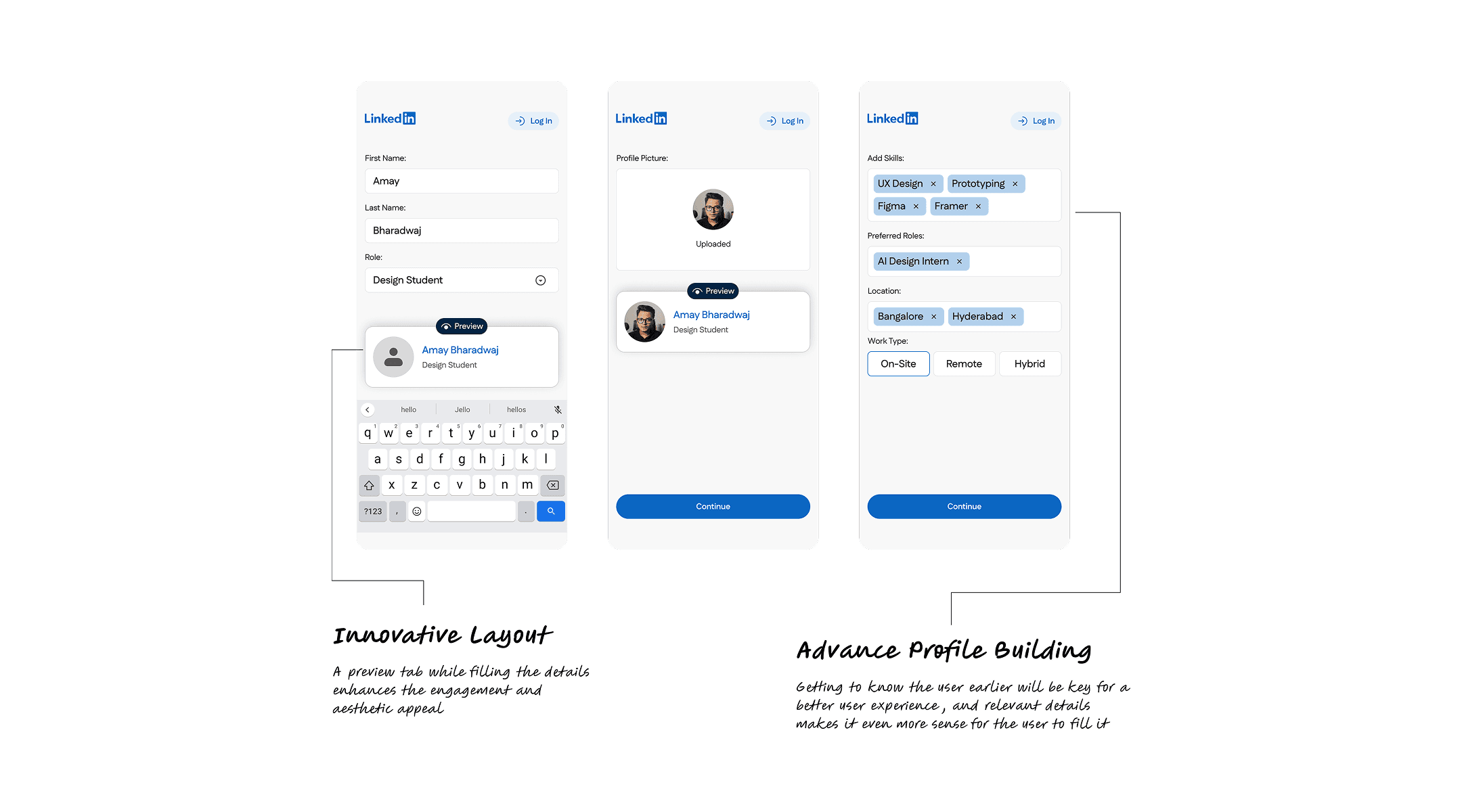
The flow adapts based on the user’s intent, job seeker, recruiter, creator or explorer, making the setup more relevant and reducing unnecessary steps. Quick login options keep the entry seamless, while visual avatars create a sense of personality and relatability during profile setup.
Each screen focuses on just one action at a time, supported by clean spacing and intuitive hierarchy. The goal was to help new users feel guided rather than overwhelmed, leading them into the platform with clarity, confidence and a sense of belonging.
This onboarding flow was redesigned to make the first touchpoint with LinkedIn feel more welcoming, clear and visually modern. Instead of static screens and dense layouts, I introduced lightweight 3D illustrations that set an energetic tone and help new users understand the platform’s core value quickly.
The flow adapts based on the user’s intent, job seeker, recruiter, creator or explorer, making the setup more relevant and reducing unnecessary steps. Quick login options keep the entry seamless, while visual avatars create a sense of personality and relatability during profile setup.
Each screen focuses on just one action at a time, supported by clean spacing and intuitive hierarchy. The goal was to help new users feel guided rather than overwhelmed, leading them into the platform with clarity, confidence and a sense of belonging.
Homepage Flow
Homepage Flow
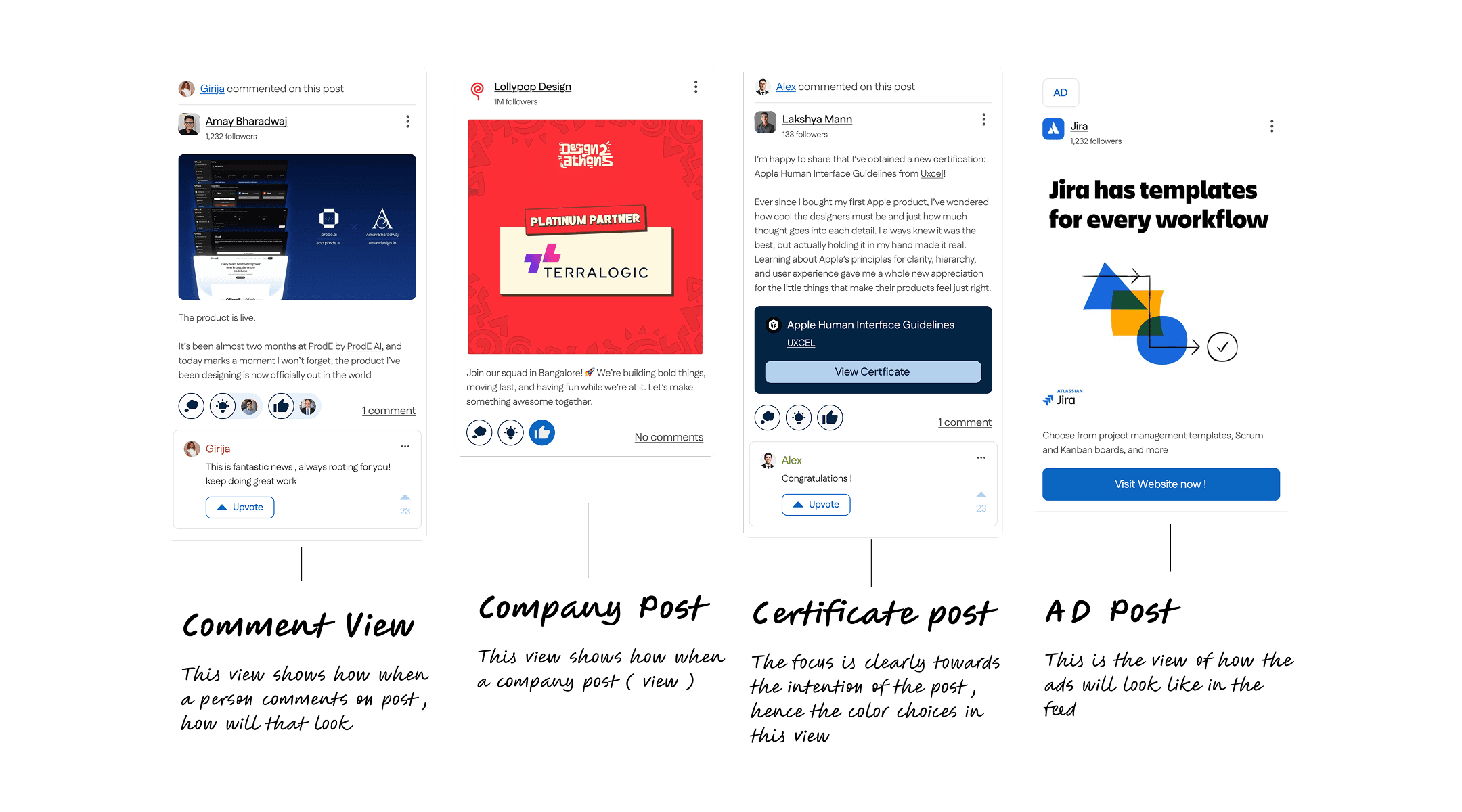
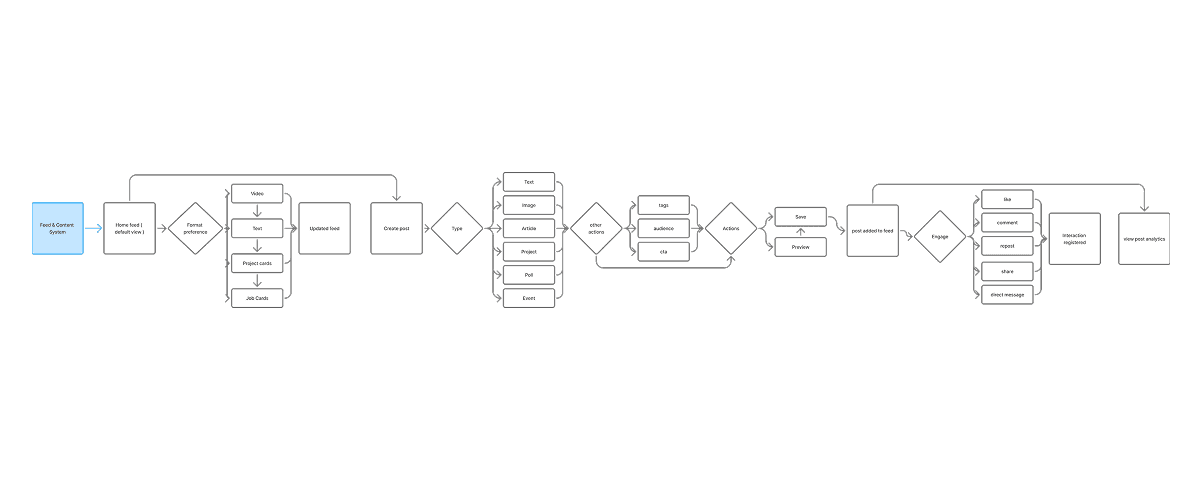
This homepage redesign focuses on making LinkedIn’s feed cleaner, more intentional and easier to consume at a glance. Instead of dense cards and scattered interactions, I simplified the layout so users can scan posts, understand context and interact without friction.
Each post surfaces only the essentials — author, content, visuals and core actions — supported by breathable spacing and a clearer hierarchy. Subtle grouping helps separate comments, reactions and metadata, reducing the typical clutter associated with LinkedIn’s feed.
I also introduced a simplified comment preview that keeps conversations visible without overwhelming the card. Key actions like upvoting, reacting and replying are designed to feel more lightweight, encouraging participation rather than hesitation.
By focusing on clarity and reducing cognitive load, this homepage aims to create a calmer reading experience where users can engage with content naturally and keep up with their network without feeling visually overloaded.
This homepage redesign focuses on making LinkedIn’s feed cleaner, more intentional and easier to consume at a glance. Instead of dense cards and scattered interactions, I simplified the layout so users can scan posts, understand context and interact without friction.
Each post surfaces only the essentials — author, content, visuals and core actions — supported by breathable spacing and a clearer hierarchy. Subtle grouping helps separate comments, reactions and metadata, reducing the typical clutter associated with LinkedIn’s feed.
I also introduced a simplified comment preview that keeps conversations visible without overwhelming the card. Key actions like upvoting, reacting and replying are designed to feel more lightweight, encouraging participation rather than hesitation.
By focusing on clarity and reducing cognitive load, this homepage aims to create a calmer reading experience where users can engage with content naturally and keep up with their network without feeling visually overloaded.
Network Flow
Network Flow
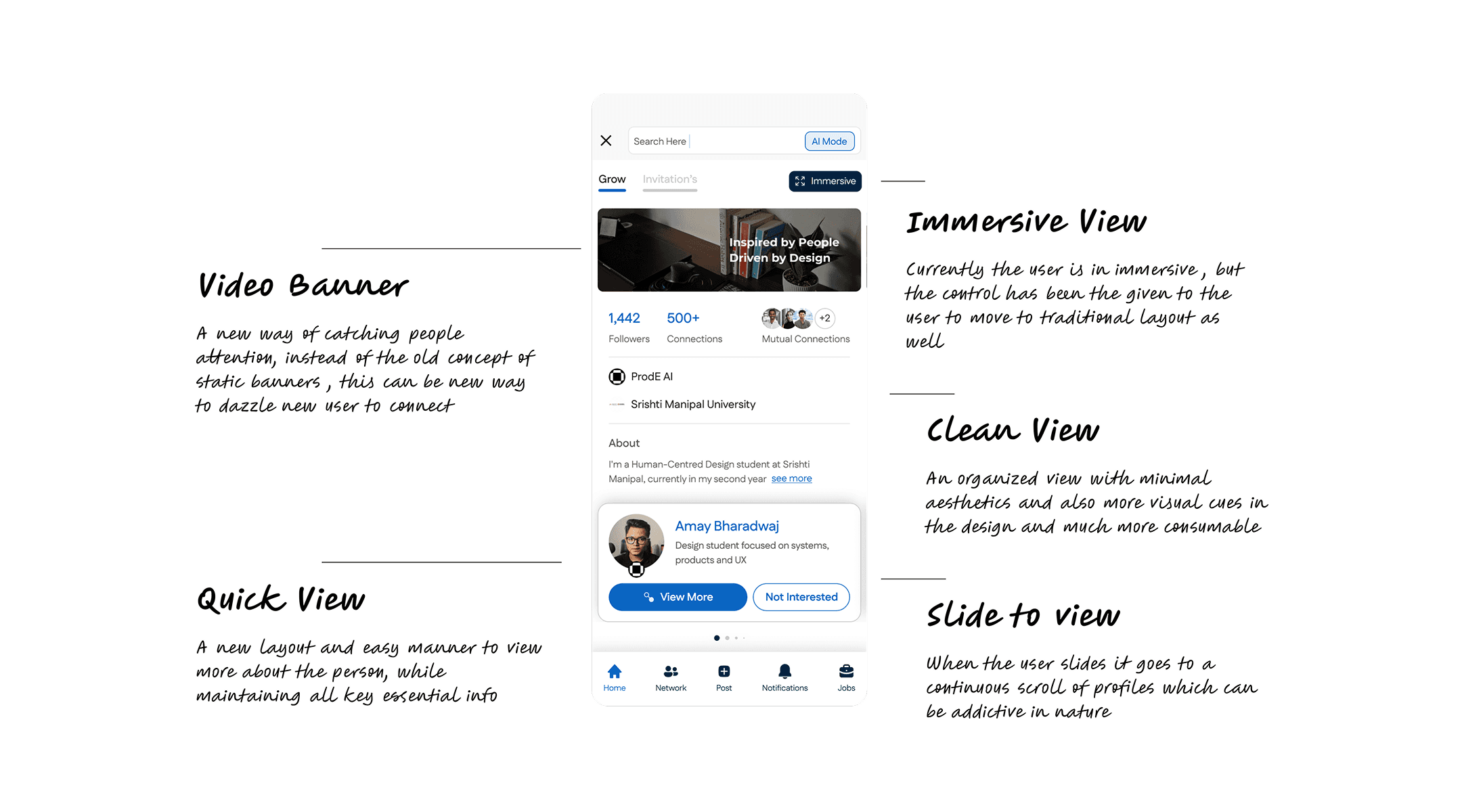
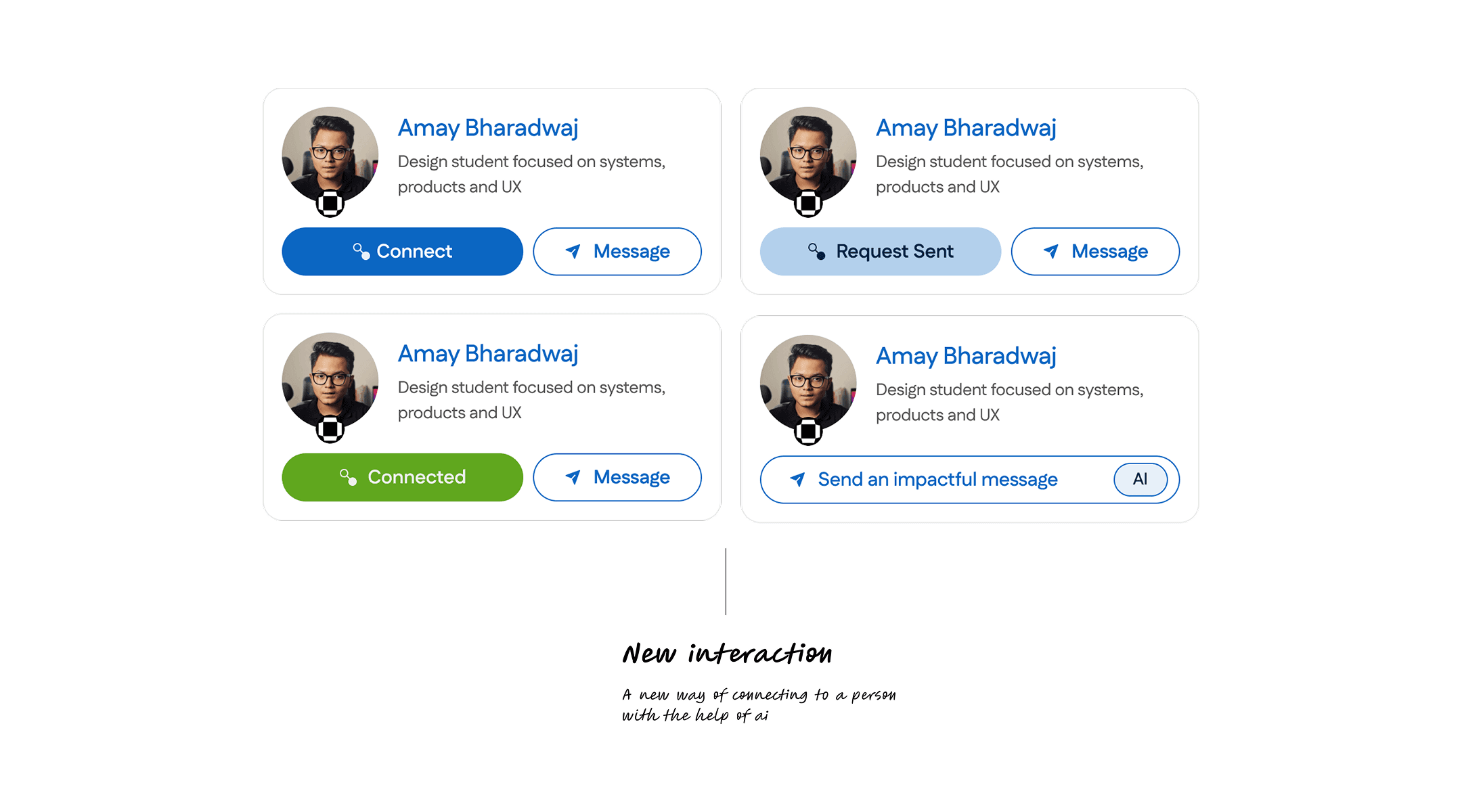
This flow was redesigned to make browsing and discovering professionals on LinkedIn more intentional and less overwhelming. Instead of dense profile cards and scattered actions, I created a cleaner layout that surfaces only the most essential information — name, role, skills and mutual connections, helping users form quicker first impressions.
The “View More” and “Not Interested” actions offer lightweight decision-making, allowing users to sort through profiles without cognitive fatigue. Profile cards are spaced generously and structured with clear hierarchy, making the browsing experience calmer and more consumable.
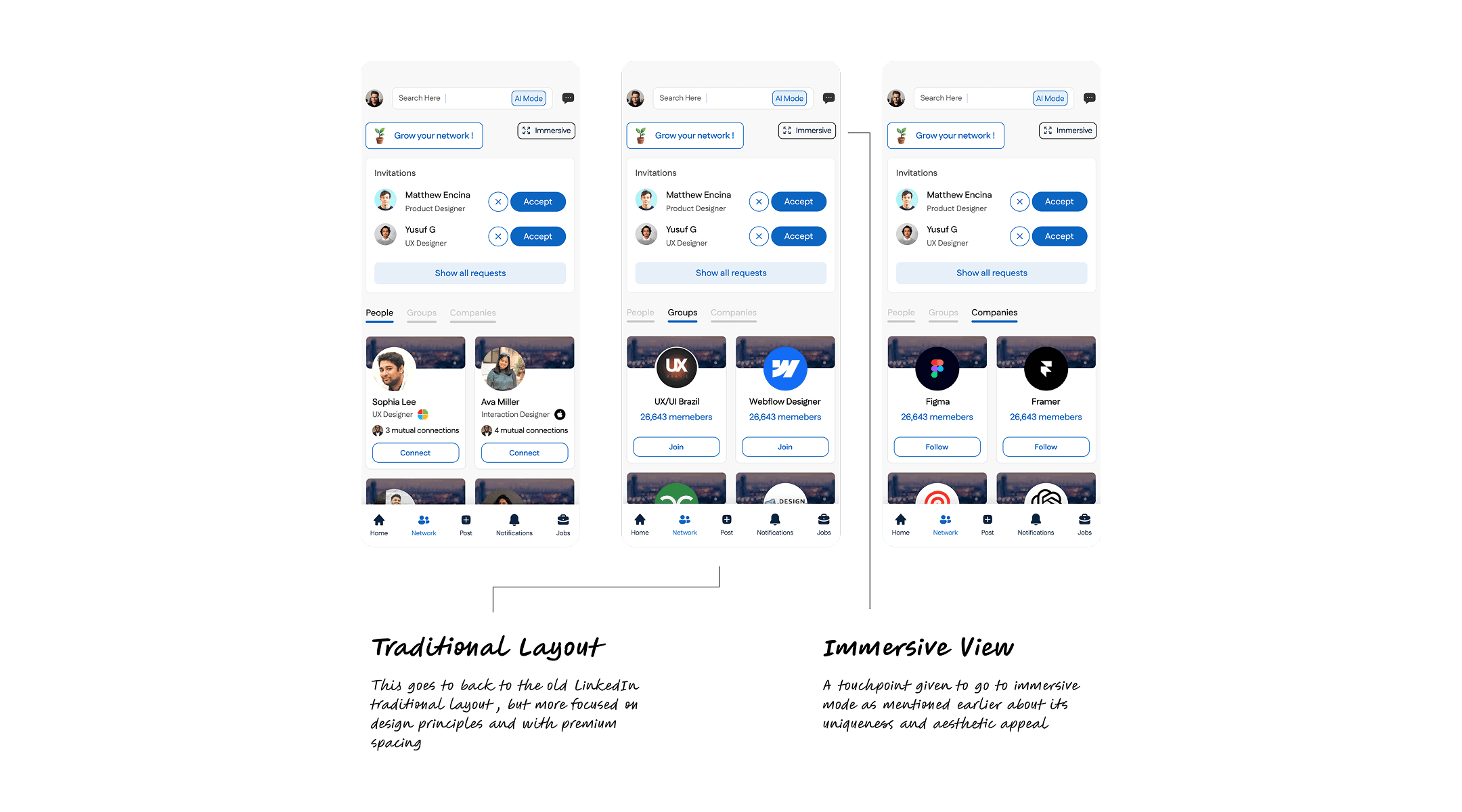
To support faster exploration, I introduced a slide-based browsing interaction where users can quickly move through multiple profiles in sequence. For moments where users want deeper context, the immersive mode creates a focused, distraction-free viewing option while still giving control to switch back to the traditional layout.
This flow focuses on clarity, speed and user control, reducing the friction typically associated with networking and making profile discovery feel more intuitive and enjoyable.
This flow was redesigned to make browsing and discovering professionals on LinkedIn more intentional and less overwhelming. Instead of dense profile cards and scattered actions, I created a cleaner layout that surfaces only the most essential information — name, role, skills and mutual connections, helping users form quicker first impressions.
The “View More” and “Not Interested” actions offer lightweight decision-making, allowing users to sort through profiles without cognitive fatigue. Profile cards are spaced generously and structured with clear hierarchy, making the browsing experience calmer and more consumable.
To support faster exploration, I introduced a slide-based browsing interaction where users can quickly move through multiple profiles in sequence. For moments where users want deeper context, the immersive mode creates a focused, distraction-free viewing option while still giving control to switch back to the traditional layout.
This flow focuses on clarity, speed and user control, reducing the friction typically associated with networking and making profile discovery feel more intuitive and enjoyable.
Jobs Flow
Jobs Flow
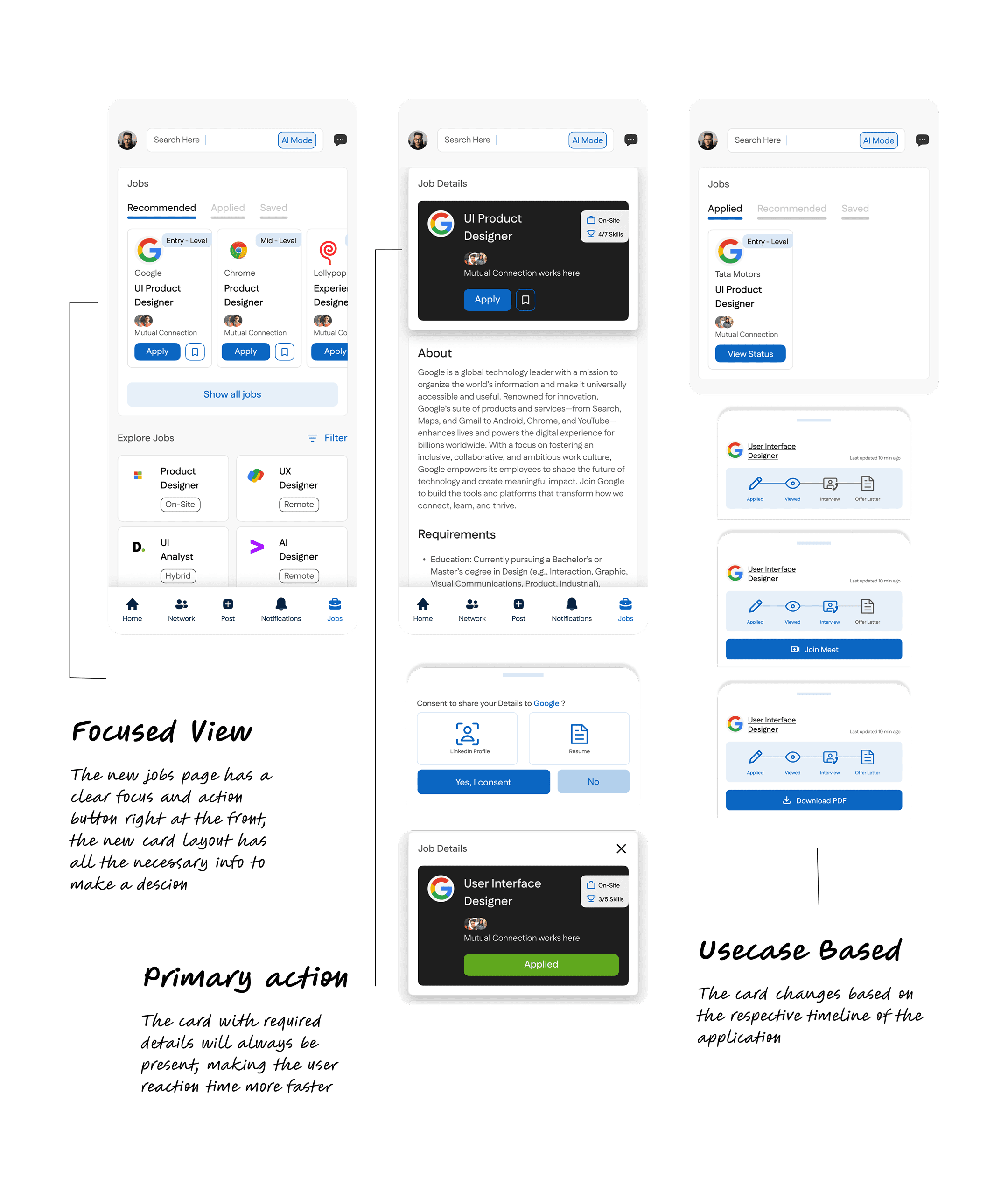
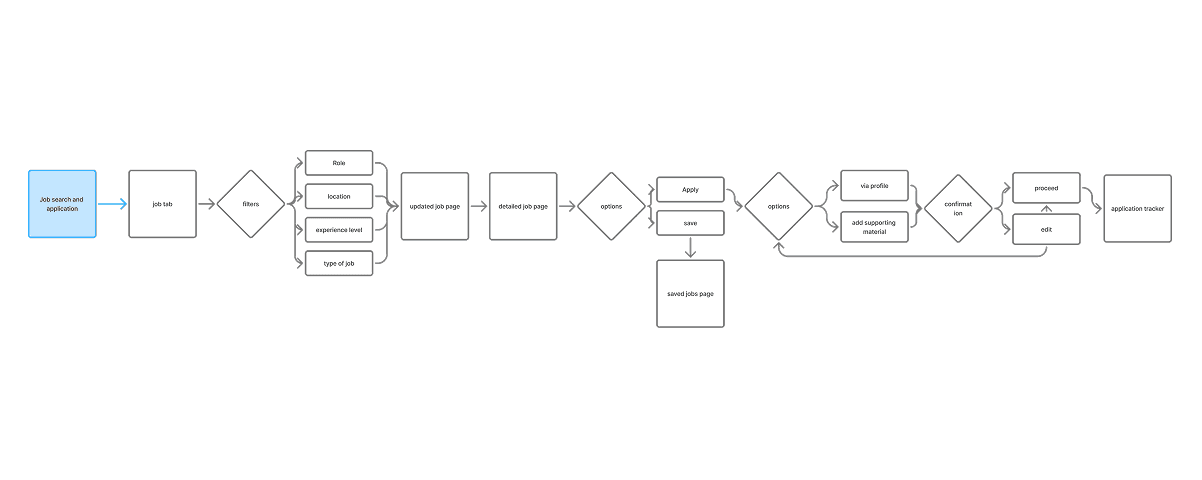
This flow was redesigned to make finding the right job feel faster, clearer and more relevant. Instead of scrolling through long, mixed feeds, I introduced a structured system with Recommended, Applied and Saved tabs, helping users stay organized and track their progress without friction.
Each job card surfaces only the essentials: role, company, level, mutual connections and core actions like Apply or Save. Clean spacing and consistent hierarchy make the cards easy to compare, reducing the mental load of evaluating multiple opportunities.
The redesign also highlights specialized filters and an Explore Jobs section that lets users browse roles by skill, work mode or category. This helps users navigate the job landscape more intentionally rather than feeling lost in endless listings.
By focusing on clarity and breathing room, this flow aims to make job discovery feel less stressful and more actionable, giving users the confidence to explore, evaluate and apply with ease.
This flow was redesigned to make finding the right job feel faster, clearer and more relevant. Instead of scrolling through long, mixed feeds, I introduced a structured system with Recommended, Applied and Saved tabs, helping users stay organized and track their progress without friction.
Each job card surfaces only the essentials: role, company, level, mutual connections and core actions like Apply or Save. Clean spacing and consistent hierarchy make the cards easy to compare, reducing the mental load of evaluating multiple opportunities.
The redesign also highlights specialized filters and an Explore Jobs section that lets users browse roles by skill, work mode or category. This helps users navigate the job landscape more intentionally rather than feeling lost in endless listings.
By focusing on clarity and breathing room, this flow aims to make job discovery feel less stressful and more actionable, giving users the confidence to explore, evaluate and apply with ease.
REFLECTION
This redesign was a small reminder of why I enjoy product design in the first place. I wasn’t trying to overhaul LinkedIn or claim that I knew better than the real team. I simply followed the instinct that the experience could feel kinder and less demanding. When I simplified a card, tightened a flow or removed an unnecessary step, it genuinely felt like the product was taking a deep breath.
Working through this taught me how much of design is really about intention, understanding what people are trying to do, what’s getting in their way and how small shifts in structure or spacing can completely change how they feel. It showed me that thoughtful design doesn’t always announce itself loudly. It just quietly makes everything easier
This redesign was a small reminder of why I enjoy product design in the first place. I wasn’t trying to overhaul LinkedIn or claim that I knew better than the real team. I simply followed the instinct that the experience could feel kinder and less demanding. When I simplified a card, tightened a flow or removed an unnecessary step, it genuinely felt like the product was taking a deep breath.
Working through this taught me how much of design is really about intention, understanding what people are trying to do, what’s getting in their way and how small shifts in structure or spacing can completely change how they feel. It showed me that thoughtful design doesn’t always announce itself loudly. It just quietly makes everything easier