
PRODE AI
PRODE AI
INTERNSHIP • SHIPPED • 2025
INTERNSHIP • SHIPPED • 2025
ROLE
ROLE
UI/UX &
Content Developer
UI/UX &
Content Developer
TIMELINE
TIMELINE
12 weeks
2025
12 weeks
2025
DELIVERABLES
DELIVERABLES
Product Screens
Brand Assets
Product Screens
Brand Assets
SKILLS
SKILLS
UI/UX Design
Visual Design
Shipped Work
UI/UX Design
Visual Design
Shipped Work
OVERVIEW
OVERVIEW
Turning repo setup into a guided, low-friction start
Turning repo setup into a guided, low-friction start
ProdE is an AI tool for navigating large codebases through a chat-first workflow. I designed the onboarding and the chat interface, keeping the experience clear, guided, and easy to pick up. I also contributed to startup collateral including the pitch deck, website visuals, business card, and document design, focusing on consistency and readability under a tight timeline
ProdE is an AI tool for navigating large codebases through a chat-first workflow. I designed the onboarding and the chat interface, keeping the experience clear, guided, and easy to pick up. I also contributed to startup collateral including the pitch deck, website visuals, business card, and document design, focusing on consistency and readability under a tight timeline
Onboarding UX
Onboarding UX
Designing the first screens that help users connect a workspace and understand what ProdE does, without making them read a manual
Designing the first screens that help users connect a workspace and understand what ProdE does, without making them read a manual
Brand Extension
After UI delivery, extending the work into branding by designing the logo and basic brand system to match the product.
Decision first UI
Building tight information architecture so users can choose service, location, and time without second guessing
Chat interface
Chat interface
Shaping the core interaction layer where users ask, explore, and act, with emphasis on layout clarity and predictable messaging patterns
Shaping the core interaction layer where users ask, explore, and act, with emphasis on layout clarity and predictable messaging patterns
Brand and comms collateral
Brand and comms collateral
Supporting launch and fundraising with clean, reusable visuals across the pitch deck, website, business card, and key documents
Supporting launch and fundraising with clean, reusable visuals across the pitch deck, website, business card, and key documents
THE REALITY CHECK
THE REALITY CHECK
Constraints I designed around
Constraints I designed around
No time for deep research
So I leaned on quick stakeholder alignment, lightweight audits of similar tools, and fast internal iteration
Developers don’t tolerate friction
No time for deep research
So onboarding had to be short, skippable, and reversible. Every step earned its place
So I leaned on quick stakeholder alignment, lightweight audits of similar tools, and fast internal iteration
Developers don’t tolerate friction
So onboarding had to be short, skippable, and reversible. Every step earned its place
Trust matters more than novelty
So the UI prioritised clarity and transparency, not “AI magic”. Clear states, clear source context, clear next actions.
Lots of work, limited visibility
So I focused on shippable surfaces I could own end-to-end: onboarding, chat UI, and launch collateral
Trust matters more than novelty
No time for deep research
So the UI prioritised clarity and transparency, not “AI magic”. Clear states, clear source context, clear next actions.
So I leaned on quick stakeholder alignment, lightweight audits of similar tools, and fast internal iteration
Developers don’t tolerate friction
So onboarding had to be short, skippable, and reversible. Every step earned its place
Trust matters more than novelty
So the UI prioritised clarity and transparency, not “AI magic”. Clear states, clear source context, clear next actions.
Lots of work, limited visibility
So I focused on shippable surfaces I could own end-to-end: onboarding, chat UI, and launch collateral
Lots of work, limited visibility
So I focused on shippable surfaces I could own end-to-end: onboarding, chat UI, and launch collateral
No time for deep research
So I leaned on quick stakeholder alignment, lightweight audits of similar tools, and fast internal iteration
Developers don’t tolerate friction
So onboarding had to be short, skippable, and reversible. Every step earned its place
Trust matters more than novelty
So the UI prioritised clarity and transparency, not “AI magic”. Clear states, clear source context, clear next actions.
Lots of work, limited visibility
So I focused on shippable surfaces I could own end-to-end: onboarding, chat UI, and launch collateral
SOLUTION
SOLUTION
A guided start for multi-repo codebases, without the setup pain
A guided start for multi-repo codebases, without the setup pain
I shaped the first session so it feels predictable: connect, wait with clear feedback, then start asking. The solution leans on step-by-step structure, visible system states, and a calm UI that makes early usage feel safe, not experimental
I shaped the first session so it feels predictable: connect, wait with clear feedback, then start asking. The solution leans on step-by-step structure, visible system states, and a calm UI that makes early usage feel safe, not experimental
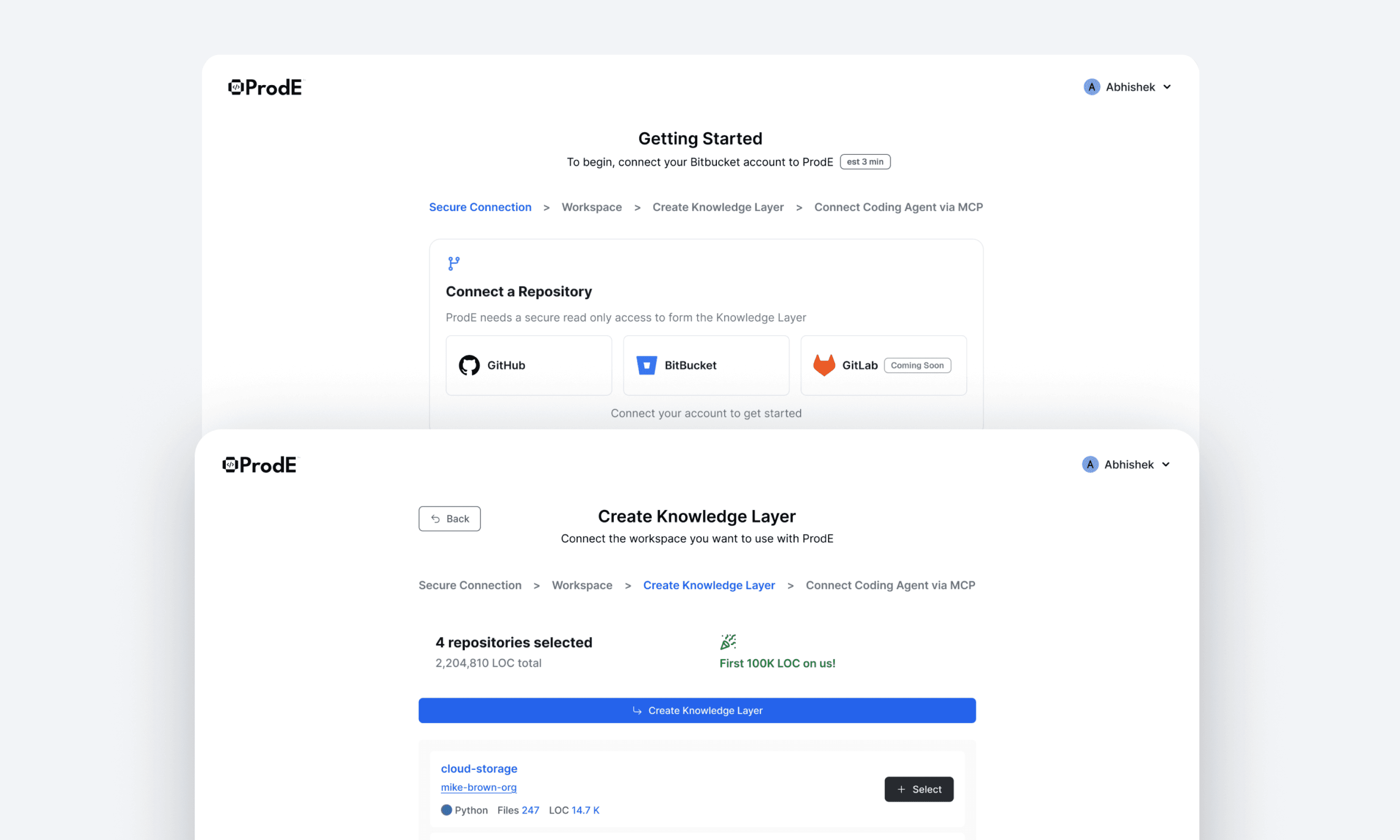
Step-based onboarding
Small steps, clear CTAs, and explicit progress so users don’t wonder if the tool is stuck or doing the right thing
Trust states in the chat
Loading, thinking, empty, and error states are treated as product moments, not placeholders, so the experience stays credible even when the system is slow or uncertain
Consistent launch layer
The same visual logic carries into external collateral, so the product and its pitch feel like one system, not separate artifacts
Trust states in the chat
Loading, thinking, empty, and error states are treated as product moments, not placeholders, so the experience stays credible even when the system is slow or uncertain
Consistent launch layer
The same visual logic carries into external collateral, so the product and its pitch feel like one system, not separate artifacts
Decision-first booking
Service, crop, and schedule are structured to prevent wrong requests.
Visibility during service
Live tracking + status states reduce anxiety and support calls.
Clear closure
Summary and confirmation make “done” feel trustworthy.
CORE FLOWS
CORE FLOWS
The core flows I shipped
The core flows I shipped
I focused on the moments that make or break first use is connecting repos into a workspace, then moving into a chat experience that stays grounded in the codebase.
I focused on the moments that make or break first use is connecting repos into a workspace, then moving into a chat experience that stays grounded in the codebase.
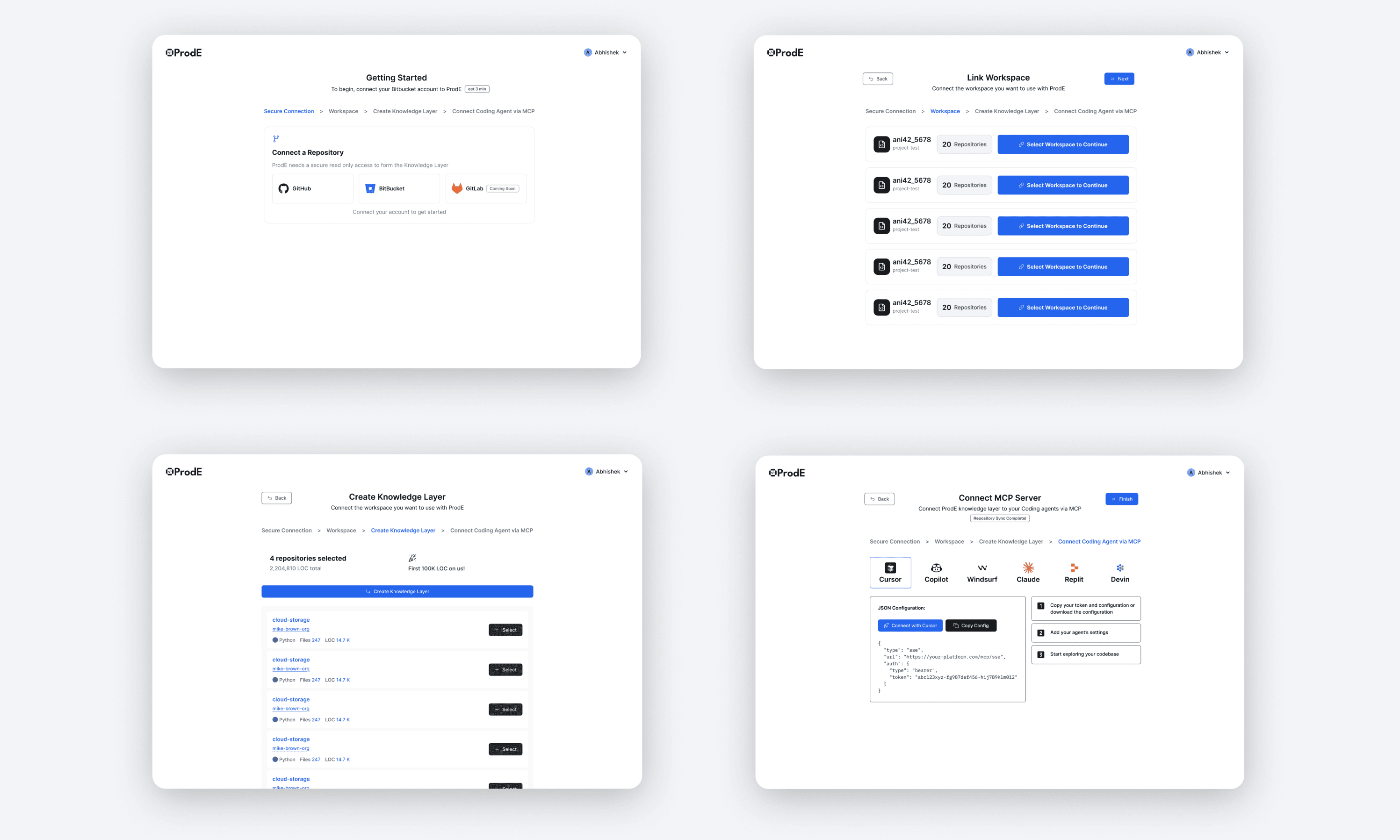
Onboarding a workspace
A guided setup that connects repos, confirms what’s being linked, and gets the workspace ready without guesswork.
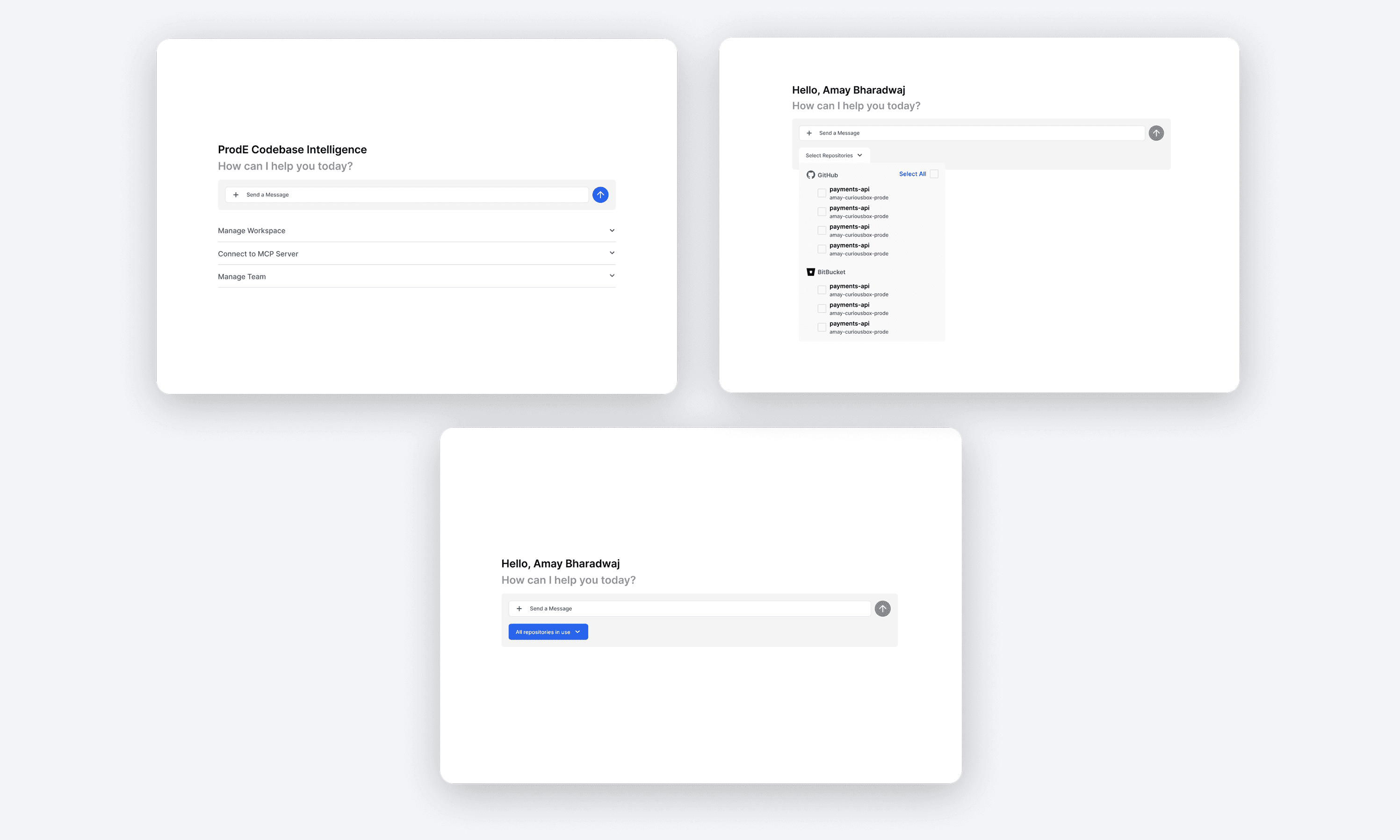
Chatting with the codebase
A focused chat UI that keeps context visible, supports quick questions, and makes it easy to switch scope when needed.
Chatting with the codebase
A focused chat UI that keeps context visible, supports quick questions, and makes it easy to switch scope when needed.
Onboarding a workspace
A guided setup that connects repos, confirms what’s being linked, and gets the workspace ready without guesswork.
Chatting with the codebase
A focused chat UI that keeps context visible, supports quick questions, and makes it easy to switch scope when needed.
VISUAL SYSTEM
A small set of components that make setup feel predictable
I focused on the surfaces that carry the most uncertainty in a dev tool setup: empty states, warnings, progress banners, and selection steps. The goal was to keep users oriented while the system is connecting repos, fetching data, and moving them to the next step
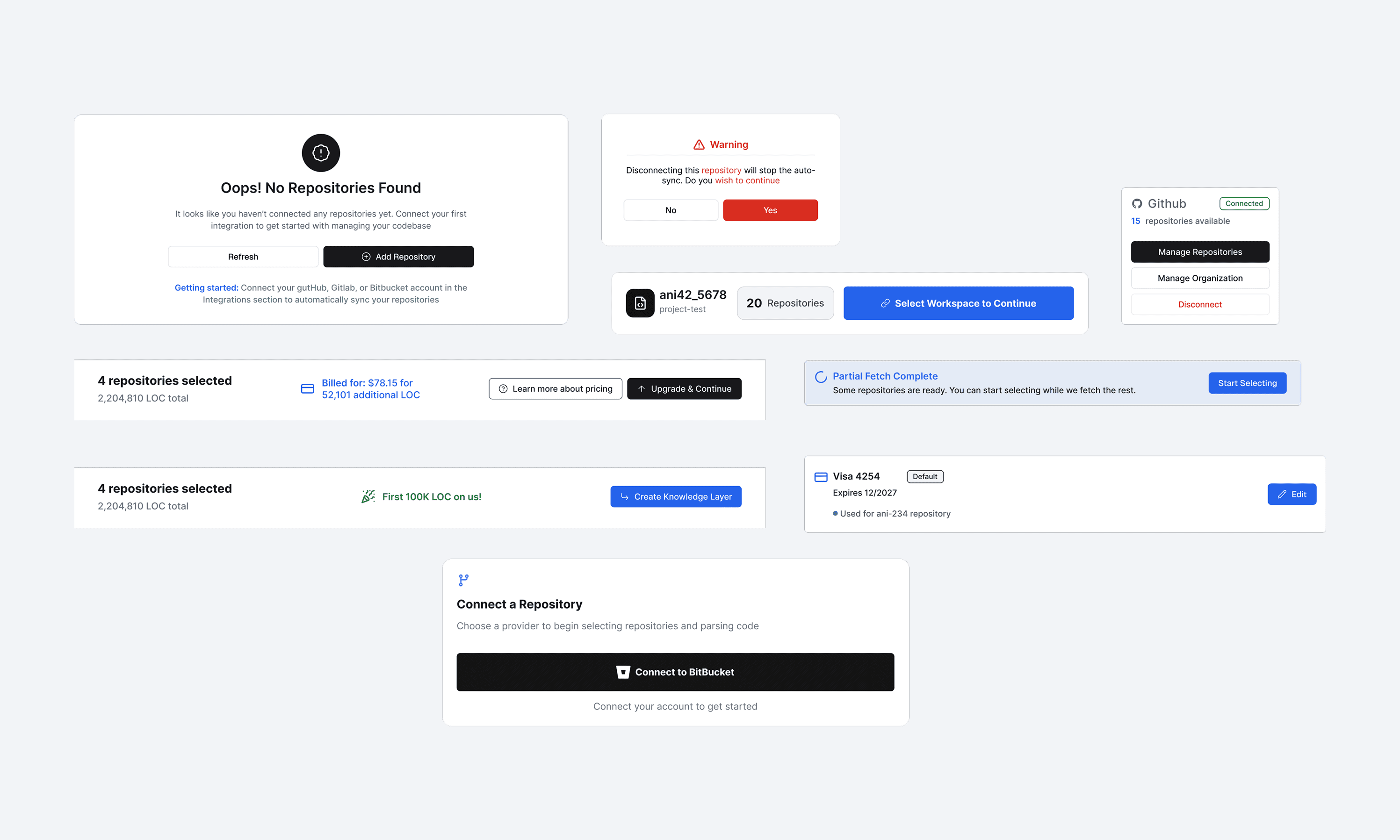
Setup states are explicit
Empty states like “No repositories found” explain what’s missing and immediately offer the next action, so users don’t guess what broke.
Warnings are clear and binary
Destructive actions like disconnecting are handled with a simple confirm modal that states the consequence upfront and avoids accidental clicks
Progress is communicated in-system
Setup states are explicit
Banners like “Partial fetch complete” keep the user informed while background work is still happening, without blocking the flow
Empty states like “No repositories found” explain what’s missing and immediately offer the next action, so users don’t guess what broke.
Warnings are clear and binary
Destructive actions like disconnecting are handled with a simple confirm modal that states the consequence upfront and avoids accidental clicks
Progress is communicated in-system
Banners like “Partial fetch complete” keep the user informed while background work is still happening, without blocking the flow
Selection steps are structured
Workspace selection, repository counts, and “create knowledge layer” CTAs are designed as guided steps, so setup feels like a checklist, not a form
Selection steps are structured
Workspace selection, repository counts, and “create knowledge layer” CTAs are designed as guided steps, so setup feels like a checklist, not a form
VISUAL SYSTEM
A small set of components that make setup feel predictable
I focused on the surfaces that carry the most uncertainty in a dev tool setup: empty states, warnings, progress banners, and selection steps. The goal was to keep users oriented while the system is connecting repos, fetching data, and moving them to the next step
Setup states are explicit
Empty states like “No repositories found” explain what’s missing and immediately offer the next action, so users don’t guess what broke.
Warnings are clear and binary
Destructive actions like disconnecting are handled with a simple confirm modal that states the consequence upfront and avoids accidental clicks
Progress is communicated in-system
Banners like “Partial fetch complete” keep the user informed while background work is still happening, without blocking the flow
Selection steps are structured
Workspace selection, repository counts, and “create knowledge layer” CTAs are designed as guided steps, so setup feels like a checklist, not a form
Setup states are explicit
Empty states like “No repositories found” explain what’s missing and immediately offer the next action, so users don’t guess what broke.
Warnings are clear and binary
Destructive actions like disconnecting are handled with a simple confirm modal that states the consequence upfront and avoids accidental clicks
Progress is communicated in-system
Banners like “Partial fetch complete” keep the user informed while background work is still happening, without blocking the flow
Selection steps are structured
Workspace selection, repository counts, and “create knowledge layer” CTAs are designed as guided steps, so setup feels like a checklist, not a form
GO-TO-MARKET COLLATERAL
Shipping the product story beyond the UI
Alongside the product screens, I supported the team with launch-facing assets that helped explain ProdE clearly to investors and early users. This included a product demo video, the marketing website, and a set of core brand and communication materials.
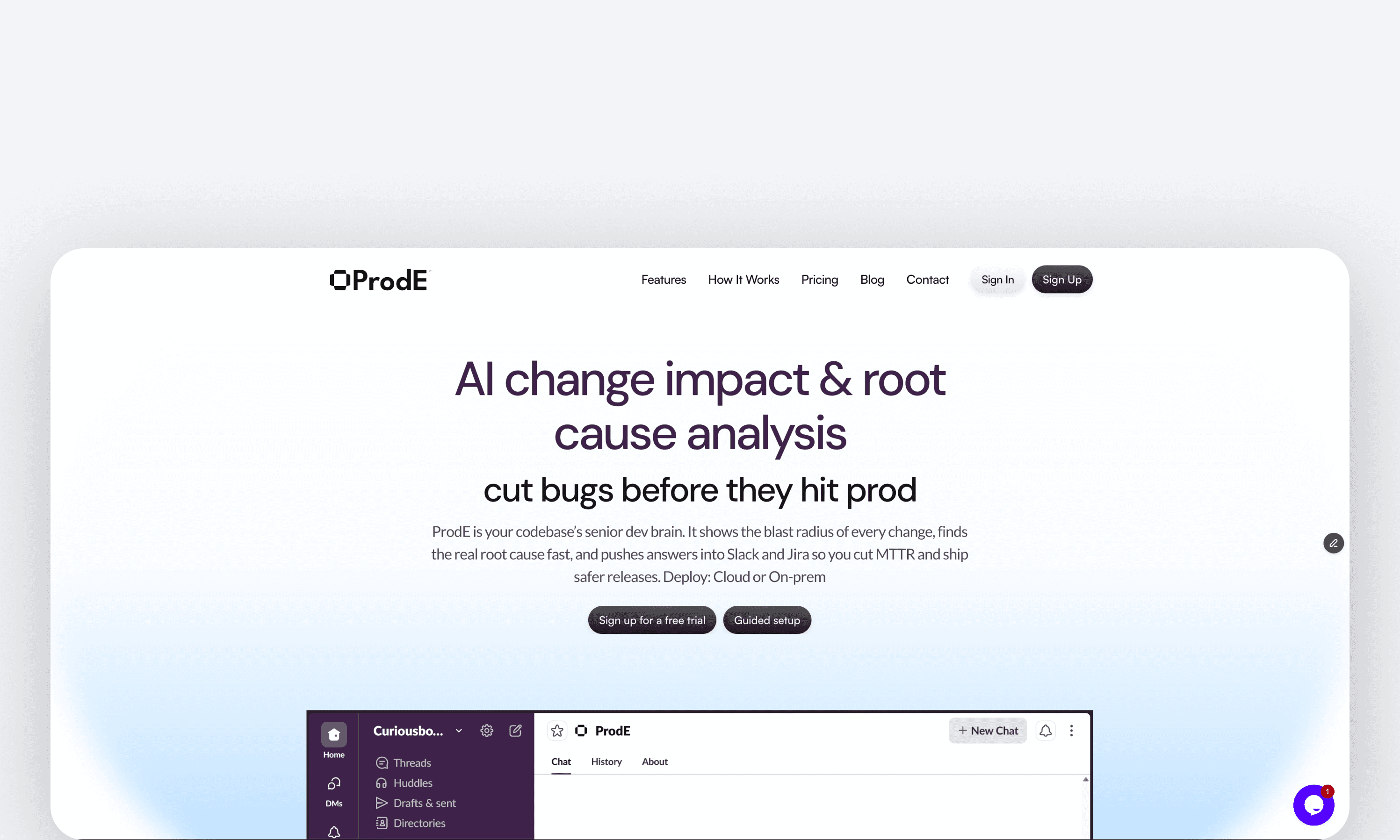
I supported the team with a short product demo video and a simple website, plus a set of marketing and investor-facing assets. Most of this work is not public, so I’m sharing only what I’m allowed to
I supported the team with a short product demo video and a simple website, plus a set of marketing and investor-facing assets. Most of this work is not public, so I’m sharing only what I’m allowed to
The other assets are as follows:
Investment pitch deck visuals
YouTube thumbnails and video graphics
Founder business card design
Document and template design for internal and external use
Social and announcement creatives
The other assets are as follows:
Investment pitch deck visuals
YouTube thumbnails and video graphics
Founder business card design
Document and template design for internal and external use
Social and announcement creatives
GO-TO-MARKET COLLATERAL
Shipping the product story beyond the UI
Alongside the product screens, I supported the team with launch-facing assets that helped explain ProdE clearly to investors and early users. This included a product demo video, the marketing website, and a set of core brand and communication materials.
REFLECTION
REFLECTION
What I learned
What I learned
Clarity is a feature
Clarity is a feature
When the product is technical, clarity is the UX. The biggest win was not adding more screens, but making the first minutes feel guided through plain language, predictable steps, and obvious next actions.
When the product is technical, clarity is the UX. The biggest win was not adding more screens, but making the first minutes feel guided through plain language, predictable steps, and obvious next actions.
Onboarding earns trust
Onboarding earns trust
If setup feels heavy, users assume the tool will be heavy too. I learned to treat onboarding like a confidence ramp: reduce choices, explain why a step exists, and confirm progress so users feel in control while connecting repositories and creating their workspace
If setup feels heavy, users assume the tool will be heavy too. I learned to treat onboarding like a confidence ramp: reduce choices, explain why a step exists, and confirm progress so users feel in control while connecting repositories and creating their workspace
Design is also communication
Design is also communication
Prode wasn’t just a UI problem. It was repos, integrations, permissions, and what the system is doing in the background. The design had to mirror that reality with clear states, warnings, and “what happens next” messaging instead of pretending everything is instant
Prode wasn’t just a UI problem. It was repos, integrations, permissions, and what the system is doing in the background. The design had to mirror that reality with clear states, warnings, and “what happens next” messaging instead of pretending everything is instant
Deadlines force clarity
Deadlines force clarity
This was built under a tight timeline with direct stakeholder feedback and limited room for broad research. It pushed me to prioritise repeatable components, fast iteration, and consistency across product screens and supporting assets so the product story stayed coherent everywhere
This was built under a tight timeline with direct stakeholder feedback and limited room for broad research. It pushed me to prioritise repeatable components, fast iteration, and consistency across product screens and supporting assets so the product story stayed coherent everywhere